Recording Received Orders
| Audience: | Purchasing Department |
| Last Reviewed: | 27 January 2026 |
| Introduction: | This topic explains how to record the delivery of an order. |
| Related Topics: | Issuing Orders |

When an order has either been delivered by the supplier - or is ready ex-works, it should be recorded in the Procurement application.
The steps below can be use to change the delivery information if required.
This functionality if not available for the Fleet Managers & Superintendents

To record a received order:
- Select a Purchase Order from the area on the left, then click the [Delivery] tab.
- Click [Goods Receipt].
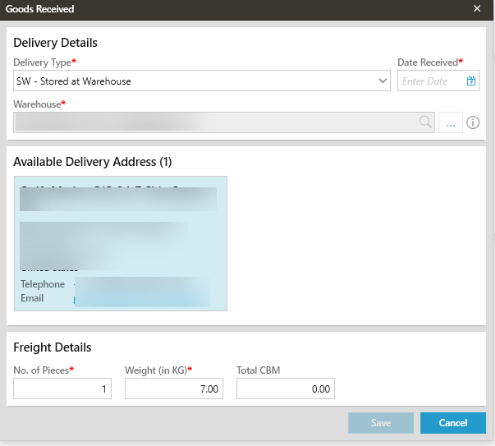
- Select one of the following delivery types from the drop-down list: OX, SW, RA or RT.
- Depending on the current status of the PO, the port / warehouse fields will already be completed although these can be change if required.
- Enter / search for a warehouse if SW delivery type has been selected.
- Enter / search for a port if OX, RA or RT delivery types has been selected.
- If the order is to be stored at the warehouse, enter the number of pieces / weight information. This is optional for all other delivery types.
- Click [Save]. The status of the order will be updated.
- If the SW option is selected , search for or type in the name of the warehouse.
What next?
Received by Vessel is the last stage in recording a delivery of goods.
 - Only the vessel has the ability to change the status of the order to RV.
FAQs
If the status of the order is RV, then it has already been received by the vessel, and therefore no further information can be added.