Crew List
| Audience: | All Crewing users |
| Last Updated: | 08 October 2025 |
| Introduction: | This topic explains how to maintain crew list |

Crew List module is used to manage crew changes for a particular vessel or group of vessels.
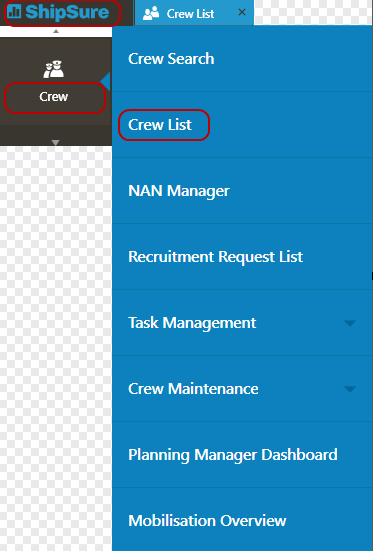
The Crew List module can be accessed by clicking the ShipSure icon > Crew > Crew List
The Crew List landing page will default to displaying the Office(s) that the user has access to

By double clicking on the highlighted office the vessels for that office will be displayed alternatively the user can user the Search function to locate an individual vessel
By Highlighting and double clicking on the vessel name the crew list for the selected vessel will be presented on screen
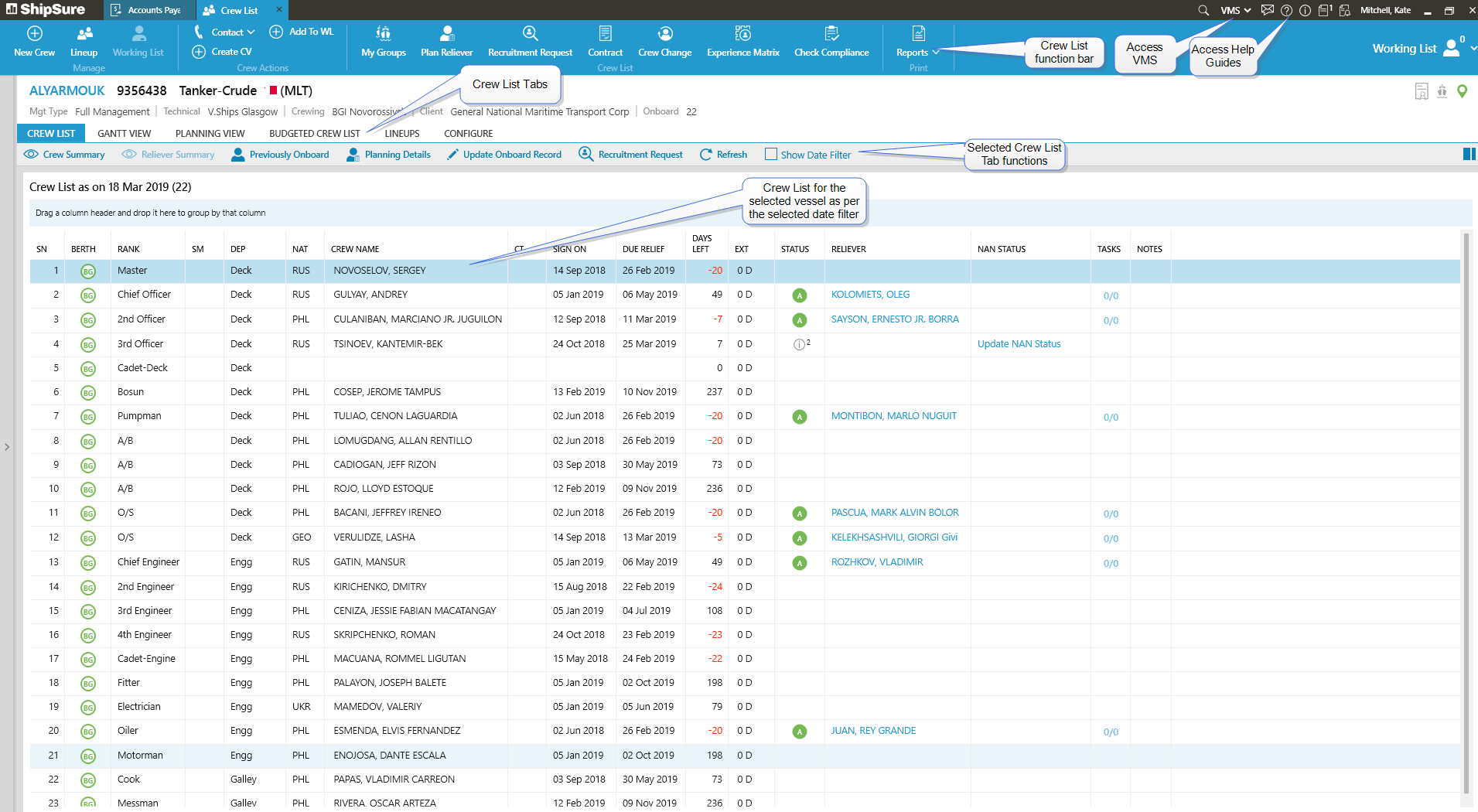
From within the Crew List the user has multiple functions to select from to carry out the work that is required to be done for the mobilisation of a ships crew
The functions available on the Blue Ribbon are detailed below and by clicking on the Hyperlink will take the user to the Help details associated with it
Add New Crew
- allows the user to create a New Crew Member record by entering their Basic and Passport Details, Management information and also search the database to see if the seafarer already exists in the system
- allows the user to manage multiple crew changes at one port for a selected vessel and also to send Flight, Hotel and Port Agent details to the seafarers’ mobile application
Crew Actions
- allows the user to Create or Schedule Contact details
- allows the user to Create a specific CV for a select seafarer
- allows the user to add a selected seafarer to the 'WL' (Working List)
My Groups
- allows the user to Create Vessel groups
Plan Reliever
- allows the user to Plan relievers for the selected seafarer via the NAN process
Recruitment Requests
- allows the user to submit recruitment and vessel details for a selected vessel and rank
Contact
- allows the user to enter Crew Contact information, Clear & Undo Cleared Scheduled Contacts
Crew Change
- allows the user to organise the Crew Change details for a selected seafarer
Experience Matrix
- allows the user to compare seafarer's experience with another by a set criteria i.e. Department and Seniority Levels
Check Compliance
- allows the user to ensure that the selected seafarer contract length is compliant with the set Parameters
Reports
- allows the user to select from a list of reports to run for the selected vessel
Crew List Tabs
Depending on the Crew List Tab selected the user will have access to use various functions
The Crew List Tab functions allow the user to view and enter seafarer information and details as required
Crew Summary displays details of the selected seafarer.
- The Seafarer details can also be viewed by using the Show / Hide icon
- The summary will display the seafarer's experience, contract history and service details
Reliever Summary displays details of the reliever for the selected seafarer
- Where a Reliever is in place for the onboard seafarer, selecting the Reliever Summary icon will display the relievers experience, contract history and service details
Previously Onboard displays details of the seafarers who were previously onboard the vessel for the selected
- The details of the seafarers who were previously onboard can be viewed by double clicking on their details line in the grid
- To remove the Previously onboard grid click on the 'x' at the corner of the tab
Planning Details displays details of the seafarers who are planned to go onboard the vessel for the selected Rank
- The details of the seafarers who were planned to go onboard can be viewed by double clicking on their details line in the grid
- To remove the Planning Details grid click on the 'x' at the corner of the tab
Update Onboard Record displays the Onboard record for the selected seafarer
- The details can be edited as required however the fields that are greyed out cannot be changed but are calculated by the Contract Length
- All fields indicated with a RED* are mandatory
Recruitment Request allows the user to submit a recruitment request
- The request is only for the selected vessel and selected rank
- The Vessel and Rank fields will be greyed out, therefore cannot be altered
Refresh will update the grid with any updated data
- This will include data that has been entered by other users or by the current user working on the crew list for the selected vessel
Show Date Filter will display the Crew list as at the default date i.e. the current day's date
- The date range can be changed as required and the Search option used to re filter the grid
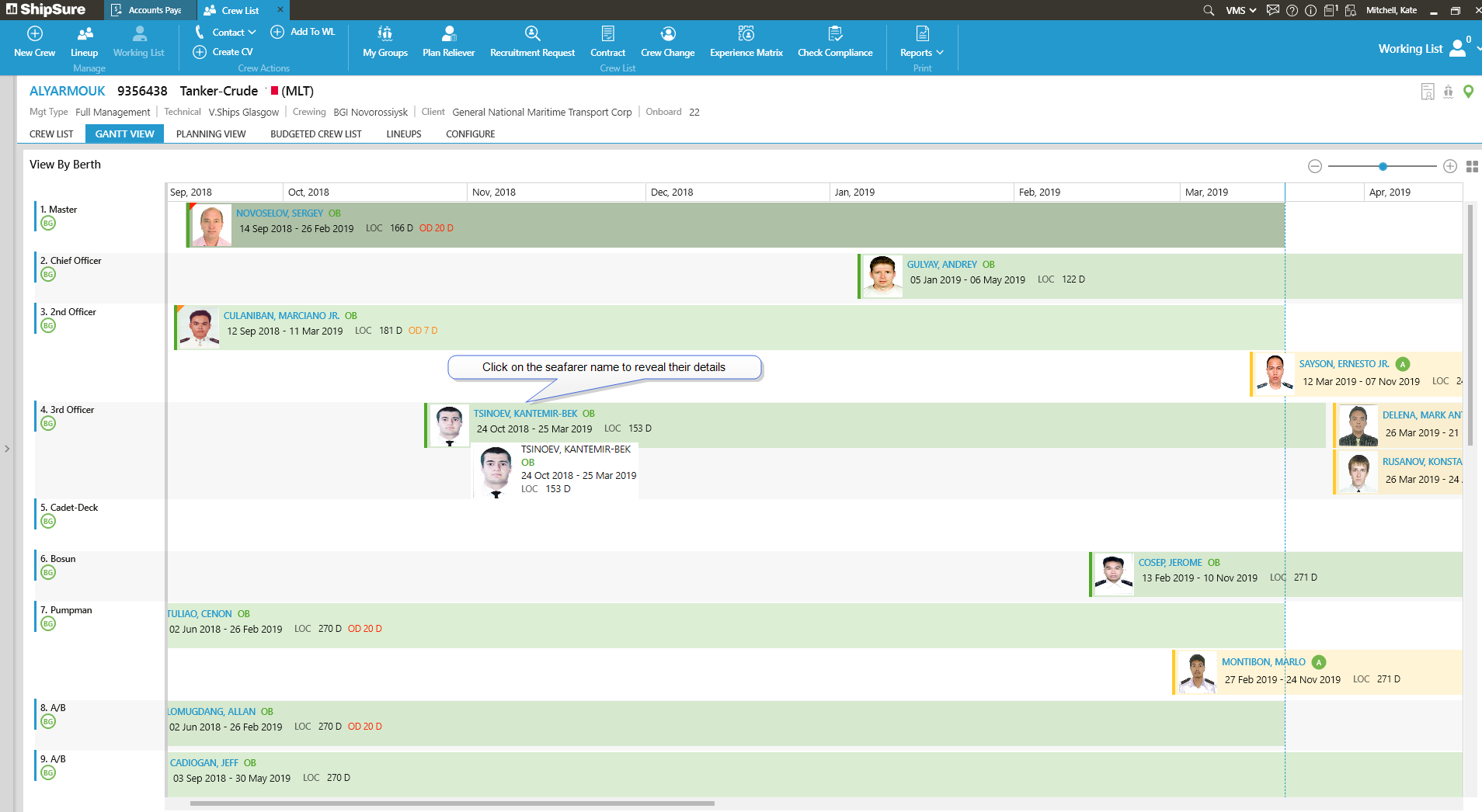
The Gantt View displays a Calendar type view of the Crew List as below
The Planning View displays the current list of seafarers onboard the vessel along with their status
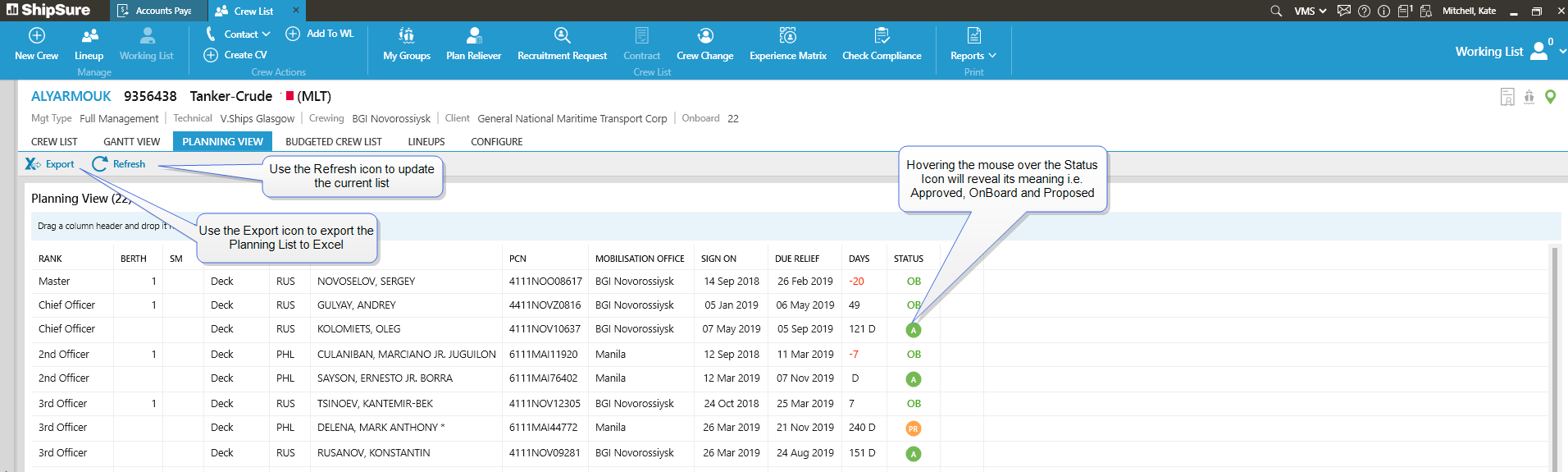
The view can be Refreshed and Exported to Excel
The Budgeted Crew List displays all of the Ranks onboard the vessel that have been included in the budget
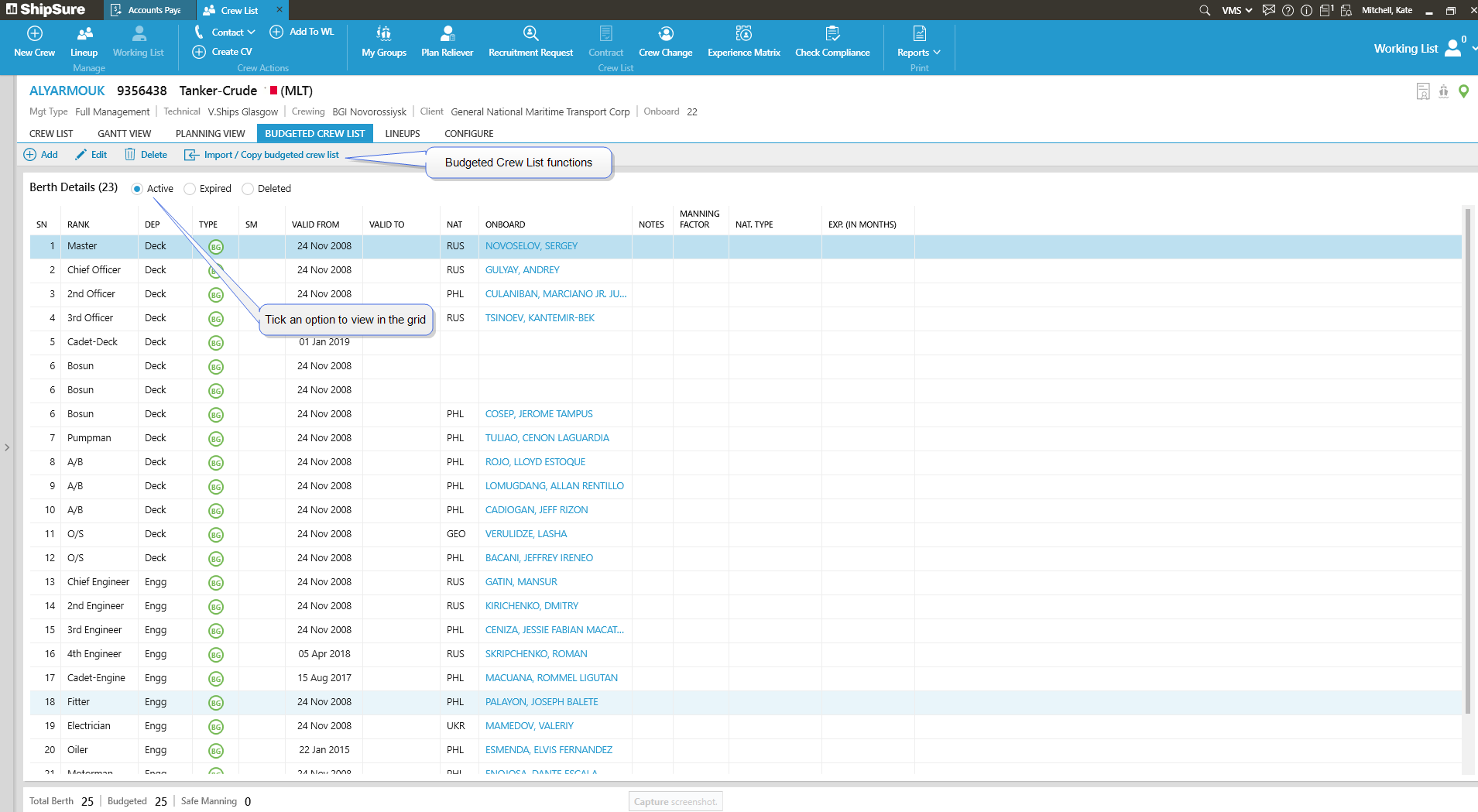
Add - allows the user to Add a New Berth to the Budgeted List
Edit - allows the user to Edit the selected Berth in the Budgeted List
Delete - allows the user to Delete the selected Berth in the Budgeted List
Import / Copy Budgeted crew list - allows the user to Import or Copy a Budgeted Crew List for the selected vessel
The Lineups Tab will display any current or historical Lineups that have been created for the vessel
If no Lineups are displayed in the grid the user can click on the  icon and proceed to Create a new LineUp
See Crew LineUp for more details
The Configure Tab allows the user to set the Next Assignment Notification (NAN)
This is the process in ShipSure by which a user can send next assignment details to seafarer on his Mobile App (V.Crew Connect)
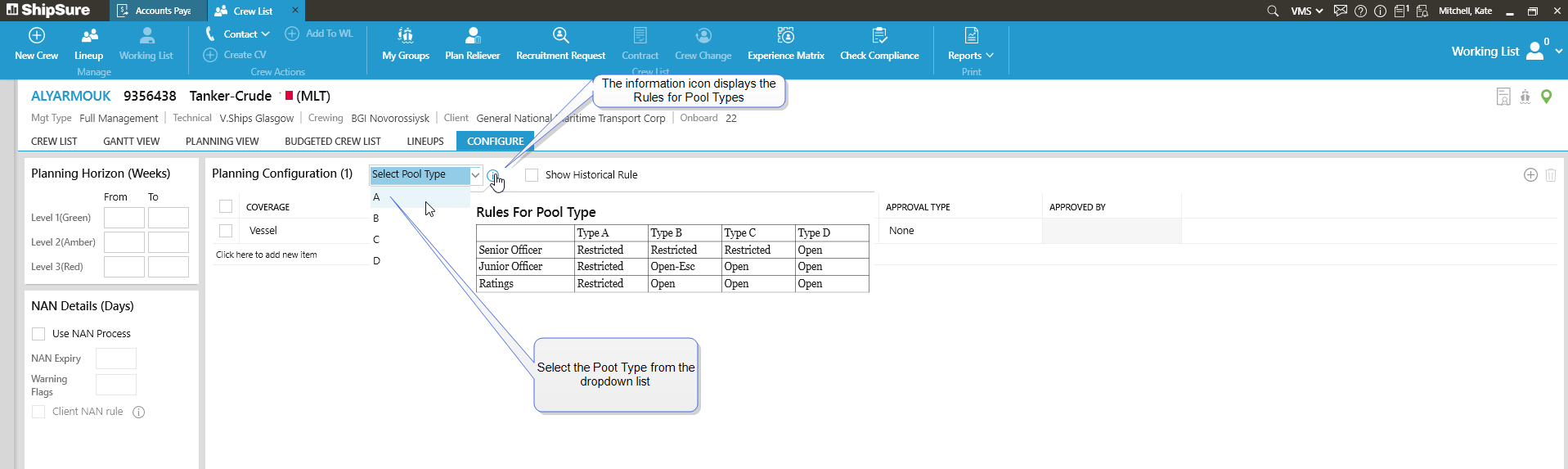
- Planning Horizon Weeks
- Enter NAN Details
- Planning Configuration based on a Selected Pool Type