Creating and Editing Manual Invoices or Credit Notes
| Audience: | Purchasing Department |
| Last Reviewed: | 27 January 2026 |
| Introduction: | This topic explains how to manually add supplier's invoices and credit notes into the purchasing application |
| Related Topics: | Using the Purchasing Screen - Viewing Invoices |

If a supplier sends their invoice or credit note via email, fax or post (i.e. if they don't use the web portal or MTML), the invoice / credit note must be added manually into the purchasing application
If the vessel receives part-deliveries, multiple invoices or credit notes may require to be added .
An invoice or credit note can also be created by opening the ShipSure menu at the top-left of the screen, then selecting [Finance], [Invoicing], then [Create PO Invoice / Credit Note].
This functionality if not available for the Fleet Managers & Superintendents

To do this:
- From the Purchasing grid, select an order at the PO stage from the list, then click the [Invoice] tab.
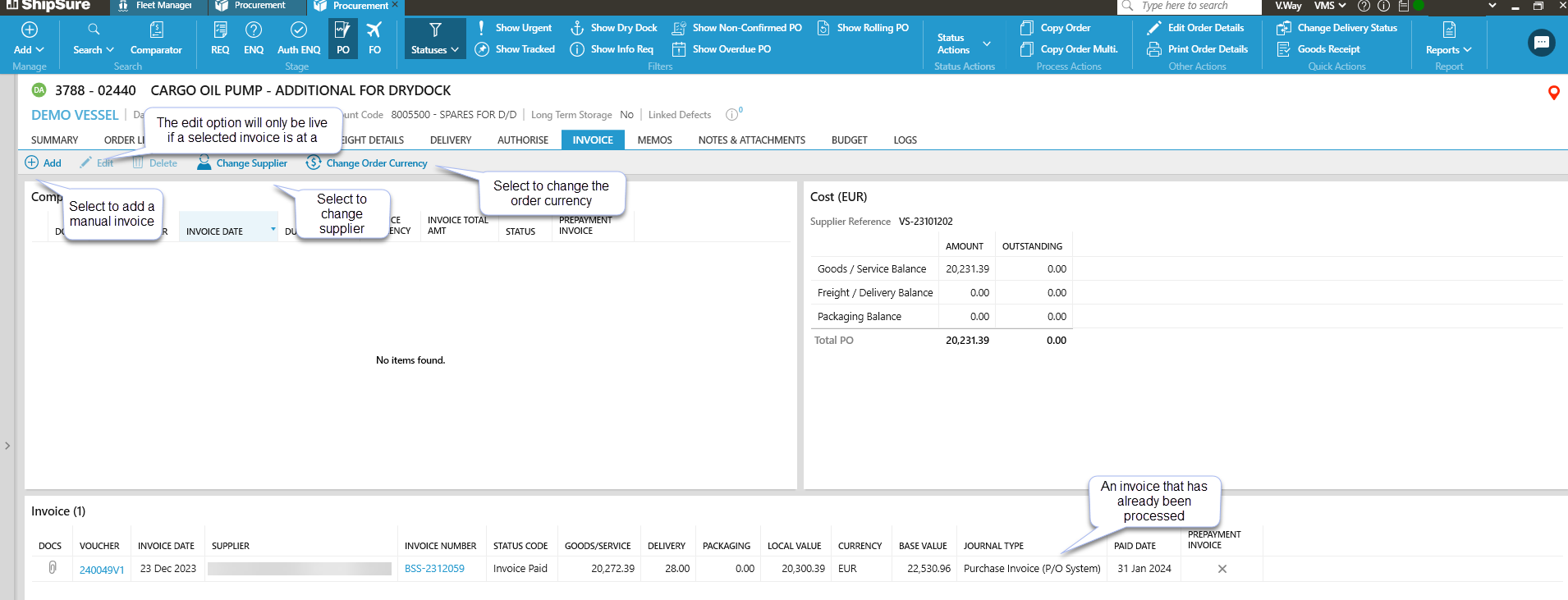
- Any previous invoice / credit notes assigned to the order will be displayed.
- Click [Add] to insert a new invoice manually.
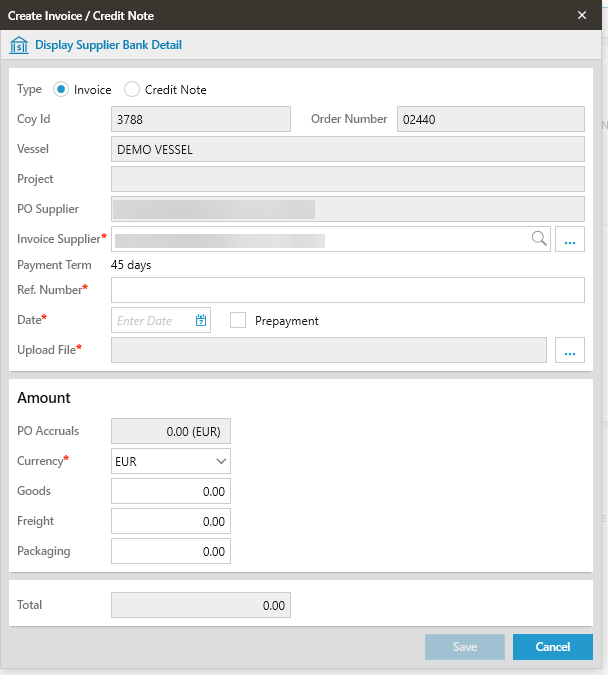
- The Coy_ID, Order Number, Supplier, PO Accruals figure and Vessel name details will be completed automatically. The exception to this rule is if the invoice has been created in the Finance module, in which case the Coy_ID and Order Number will require to be entered manually.
- Enter the Invoice Reference Number and Supplier invoice date.
- Click [...] to upload the supplier's invoice. This must be in PDF format.
- The PO Accrual figure is read-only. To change this figure see Adjusting the Accrual Amount.
- Ensure the correct currency is selected then enter the value of the goods, freight (if any) any other tax values (the fields shown in the Tax Details section will vary depending on the vessel and country). The Total Tax and Total fields will update automatically.
- Click [Save]. The new invoice can now be searched or viewed in the [Comparator] in the Superintendents queue awaiting Authorisation.
The status of invoices that can be edited must be Invoice Available for Posting (Status 10)
To edit the invoice
- Highlight the invoice.
- Click on the [Edit pencil] icon to reveal the Edit invoice grid.
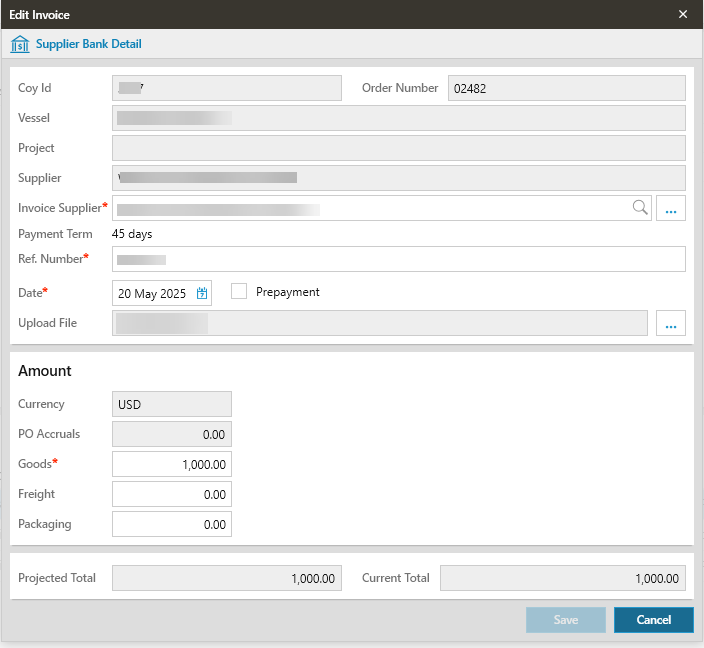
- Only those fields that have not been greyed out can be changed
- Click on [Save] when finished
Change Supplier Rules
Any order that is marked as Received or has had Invoices entered against it, cannot have the Supplier changed
An order that is, for example, at DA or DW status and not had an invoice processed against it can have the Supplier changed
The Change Supplier option should only be used when the invoice received has been submitted by another supplier for the goods ordered
To change the Supplier
- Click on the [Change Supplier] icon to reveal the Change Supplier grid.
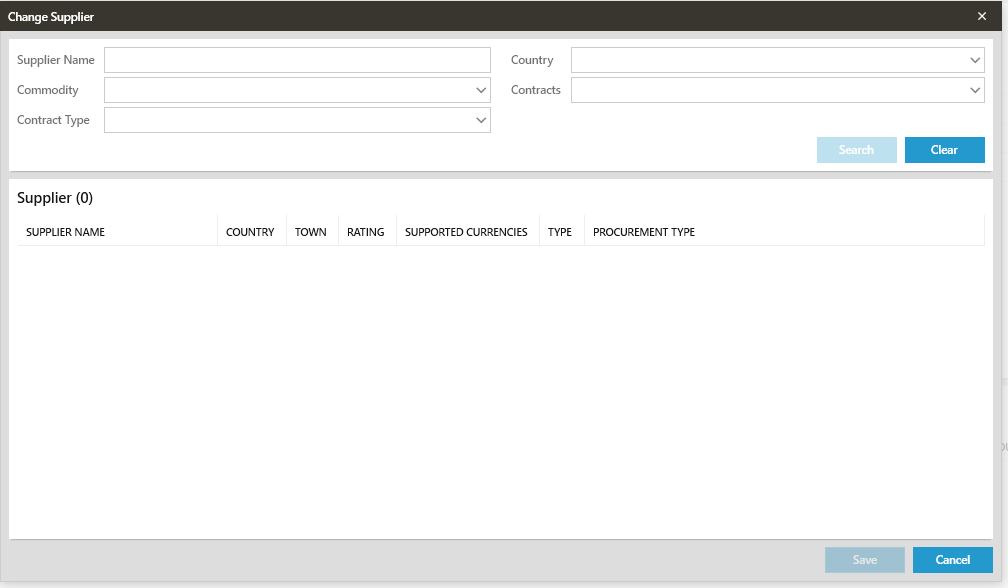
- Enter the new supplier name and select from the dropdown list
- The Currency MUST be the same as the original order or a RED bar will appear at the bottom of the screen, informing the user that the Order Currency is not Valid
- Click on the Yes / No to confirm selection
- The new Supplier details will update into the Supplier Details grid of the Invoice Tab
An invoice can be amended to Proforma [PF] status at the [PO] stage via the [Summary Tab]
To change an invoice to a Proforma Invoice
- Select the Delivery Tab and then click on the [Change Delivery Status] option
- The Change Delivery Status window will open
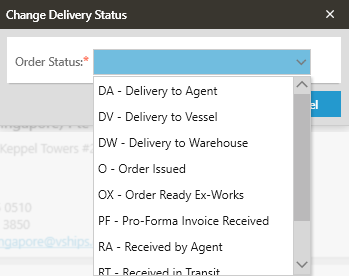
- Select the Order Status [PR - Pro-Forma Invoice Received] from the dropdown list
- Click [Save] then confirm you want to move the order to PF status
The user's role determines the invoices that can be created:
- Procurement Officers / Buyers and Technical Controllers can only create manual invoices for ships in their fleet.
- Procurement Managers can create manual invoices for the office(s) they are assigned to.
- Procurement Directors and Accountants can create manual invoices for any vessel in any fleet.