Issuing Requests for Quotes to Suppliers
| Audience: | Procurement Team with the exception of Fleet managers and Superintendents |
| Last Reviewed: | 27 January 2026 |
| Introduction: | This topic explains how to send a Request for Quotes (RFQ) to suppliers. |
| See also: | Entering Supplier Quotes |

After a Requisition has been converted to an Enquiry and potential suppliers added, the RFQ can be issued
This functionality is not available for the Fleet Managers & Superintendents

To do this:
- In the Purchasing screen, click the [Enquiry] filter, this will show all of the requisitions that have been converted for the selected vessel, then select an enquiry from the list on the left.
- Click the [Suppliers] tab to view the list of attached suppliers (for information on adding / removing suppliers, see Selecting Suppliers).
- RFQ's can also be re-issued to a supplier who has already been issued with an RFQ.
-
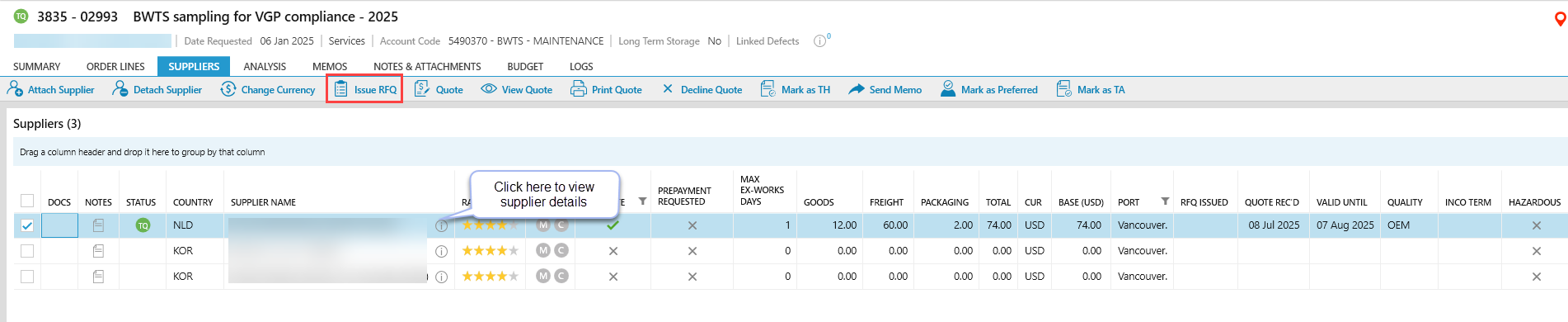
RFQ's can be issued to one or multiple suppliers. Tick the box beside each supplier to be issued with the RFQ, then click [Issue RFQ].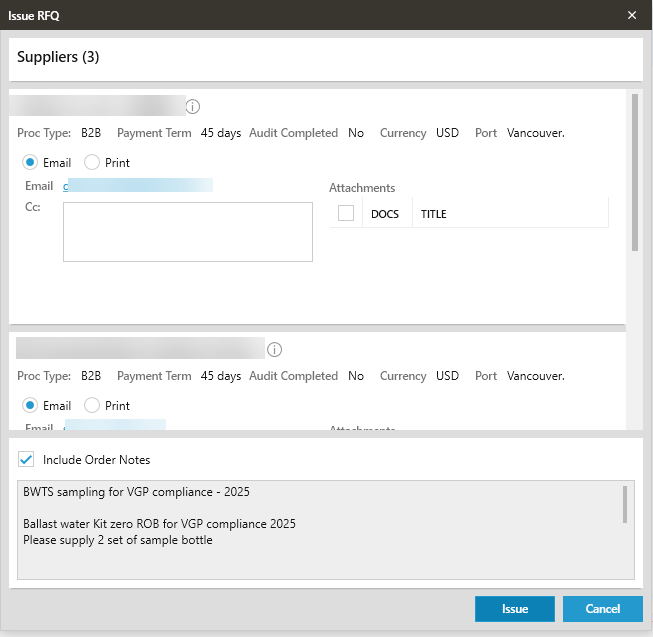
- Depending on the "type of supplier" the options for sending the RFQ are below:
- Traditional: Email, fax or print. If "email" is selected, additional addresses can be added to send the email. Attachments can also be included with the email.
- B2B: An email will be sent to the supplier inviting them to view the RFQ on the B2B website.
- MTML / ShipServ: No emails are sent. The supplier will be notified through the ShipServ interface.
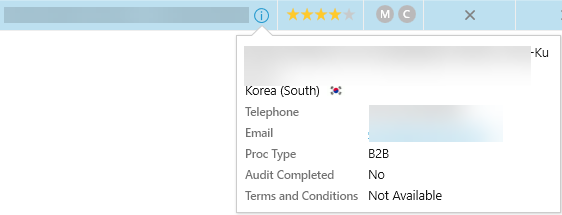
 To know which 'type of supplier' has been selected click on the information icon
  and this will display a window which shows the Supplier details and Proc Type
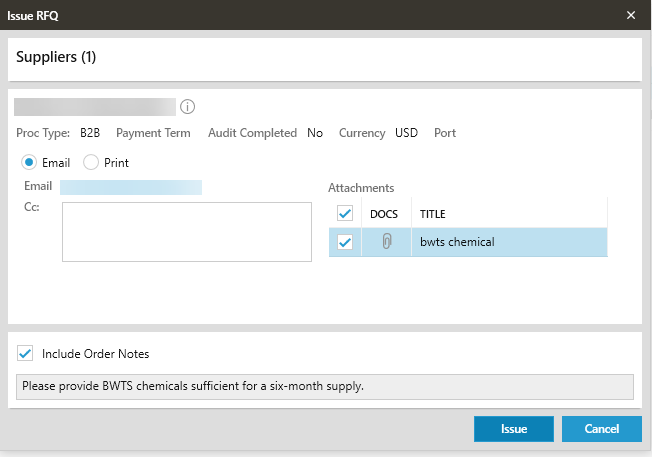
- If the attachments on the order are to be included when issuing the RFQ, select all or individual attachment(s) or nothing to exclude the available attachments.
- When the RFQ is issued the status for each supplier will change to TI.
An RFQ does not have to be issued to a supplier in order to enter a quote from them.
What next?
Suppliers can return their quotes in several different ways, which may require to be entered manually into ShipSure. When all the required quotes have been received and entered they can be analysed to identify the best one.
FAQs
The reason is that another Quote for the order has been authorised, therefore the supplier making the enquiry should be told the 'Order has been placed elsewhere and that the order is closed'.
Yes. If changes have been made to an order, e.g. editing quantities, the RFQ can be re-issued.