Copying an Existing Order
| Audience: | All users |
| Last Reviewed: | 27 January 2026 |
| Introduction: | This topic explains how to copy an existing order to create a new requisition. |
| Related Topic | Creating a Requisition |

Users have the ability to copy an existing order to create a new requisition.
The information from any order (except freight orders) can be copied over to create a new requisition.

To copy an order:
- From within the Purchasing tab, select an order from the list on the left, then click the Copy Order button at the top of the screen.
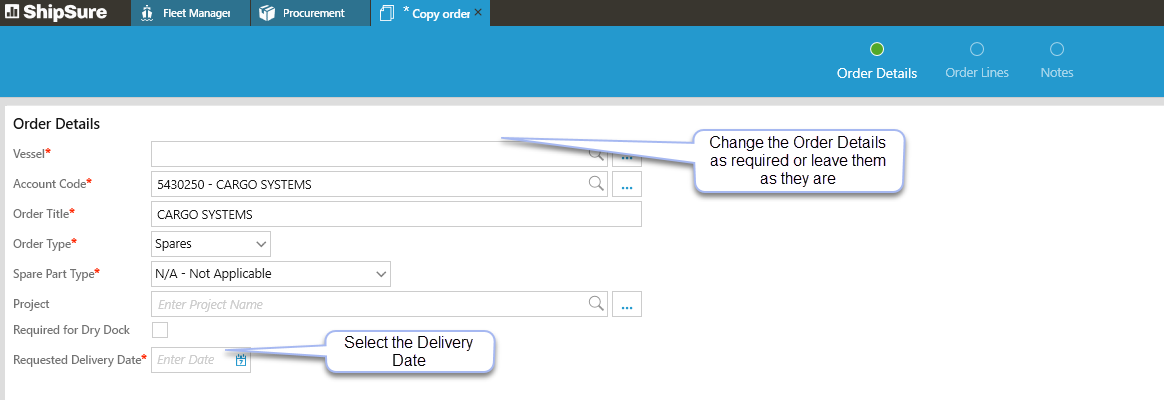
- Click Next to proceed to selecting the order lines.
- The order quantities can be changed by editing the numbers in the REQ column. Untick the box beside any line item that is not to be included in the order.
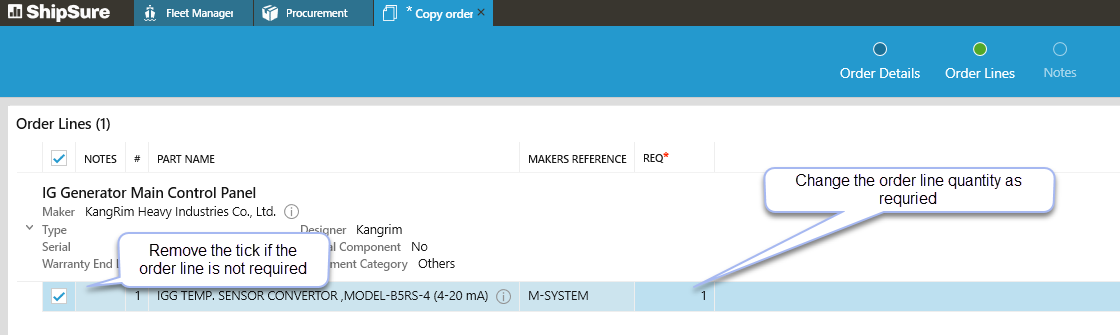
- Click Next to proceed to entering new or copying existing notes
- On the [Next] page, choose to copy or edit the previous notes, or add new notes.
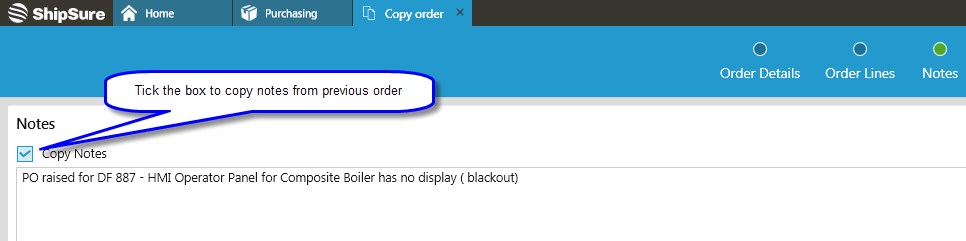
Even after selecting Finish, changes can still be made by changing the numbers in the REQ column, or by clicking Add Part. See Reviewing and Converting Requisitions.
What next?
If the requisition does not need to be split or merge this requisition, you can review it before it is converted to an enquiry.